

Missing an app?
Build it yourself with the App Builder, or have us make it. It works straight away with the same data and permissions as everything else.
Tell us what you needManaged Cowork
In Managed Cowork the files, mail and systems of your whole organisation come together. Everyone works there with the same apps, the same knowledge and AI, and only sees what fits their role. So your organisation's knowledge is there for everyone, not just for a few people. We set it up, connect your systems and keep it safe.
From €9.50 per user per month, plus AI, excluding VAT
Managed Cowork in action
Lotte asks the AI for the quarterly report. The AI collects the figures and the minutes from your own sources and prepares the report. All in 21 seconds.
The app in the film is shown in Dutch.

Apps
Managed Cowork consists of apps, just as Microsoft 365 consists of Word and Teams. They work with the same data and the same permissions, for everyone in your organisation.
The starting point for everyone
What is going on, your tasks and your AI usage in one overview. From here you open the other apps.
More about WorkspaceNever take minutes yourself again
Records your meeting, writes it out and prepares the action items. Searchable later and shared with whoever needs it.
More about Note TakerYour organisation's shared knowledge, active in Cowork
An extension of your file server or SharePoint. Here you record procedures, agreements, thoughts and ideas that need to be active company-wide, with rights per role. The AI gets its answers from it, and the vault grows with what your organisation learns.
More about Knowledge VaultInstant help with IT questions
Often solves questions and incidents straight away, day and night. If it cannot, it prepares a ticket for our service desk with all the details.
More about IT AssistantYour own apps on your own data
Build applications that fit exactly how you work, safely in a shielded environment.
More about App Builder Coming soonThe brain of your organisation, keeping work moving by itself
Synapse understands what your data means, across all your systems. It connects the dots, moves work from step to step and gives the right colleague a nudge when something needs doing. It uses the same sources as Managed Cowork.
More about Synapse Coming soonTakes work off your hands
An assistant that knows your mail, Teams and calendar and works together with the Note Taker. It schedules meetings, assigns action points and follows them up, within your permissions. So it truly becomes your personal assistant. This app is in development.
More about Personal AssistantBuild it yourself with the App Builder, or have us make it. It works straight away with the same data and permissions as everything else.
Tell us what you needYour own apps
With the App Builder you make your own apps on your own data. Infodatek validates them, so every app is secure and works just like the rest of Cowork. After that you use the app straight away. Offering it to others as well is possible later, if you want to.
Step 1
Build
You build the app with the App Builder, on your own data and within the permissions that are already in place.
Step 2
Validate
We check the app for security and for working properly. For your own use we validate part of it and keep an eye on the rest.
Step 3
Use internally
Once validated, the app works straight away in your own organisation, with the same permissions and management as the other apps.
Step 4
OptionalLaterPublish
An extra option: after validation you can also offer the app to other organisations, in a marketplace for Cowork apps. You do not need this for your own use.
Work in your own GitHub as well
Would you like that? Then we set up a GitHub repository for you in which the code of your apps stays in sync with Cowork. Your developers work in their own GitHub, with their own tools, and whatever they change there automatically appears in Cowork as well, where it goes through validation. So what you build stays yours, and you choose where you work on it.
House style
Coming soonPut your templates into Cowork once: the PowerPoint with your logo, colours and fonts, the letterhead, the quote and the report. From then on Cowork makes everything in that style, for every colleague and in every app. Whether someone asks for a presentation or the Note Taker writes up a meeting, it looks as if your marketing team worked on it themselves.
Set up once
Your house style
How a file is named
DateTypeSubject
L Lotte
“Make a presentation of the Q3 figures”
Saved as
2026-10-01 Presentation Quarterly figures Q3.pptx
S Sander
“Write up this morning's management meeting”
Saved as
2026-10-01 Minutes Management meeting.docx
N Noor
“Write a quote for the new office in Goes”
Saved as
2026-10-01 Quote Office Goes.docx
You put your templates for PowerPoint, Word and Excel into Cowork, with the logo, colours, fonts and fixed parts such as the opening and closing slide. We are happy to help.
Every colleague and every app works with the same templates: the AI, the Note Taker and the apps you build yourselves. Everyone gets it right straight away, including the new colleague on their first day.
Decide how a file is named, for example with the date, the type of document and the client or project. Cowork gives every file that name straight away, so everything in the Knowledge Vault is neatly in order and quick to find.
A new logo or a fresh colour? Replace the template, and everything Cowork makes from then on uses the new style right away.
That gives everything your organisation makes and sends one recognisable look, without anyone having to put in the effort.
Knowledge Vault
The Knowledge Vault does not replace your file server; it extends it. Your files stay on your file server or in SharePoint, and Cowork connects to them. In the Knowledge Vault you record what needs to be active company-wide: procedures, agreements, thoughts and ideas. We set it up and arrange together with you who can access what.
How we arrange the rightsYour files stay where they are, on your file server or in SharePoint. Cowork connects to them, and the Knowledge Vault adds what was not written down anywhere yet: the knowledge that should apply to everyone.
The whole organisation works from the same knowledge, organised the way you work: by department, team or project. So everyone knows how things are done.
For each role it is set who may view and edit what. When someone changes role, their access changes with it. The AI follows the same rights.
Ask a question in plain language, and the AI looks up the answer in the vault. Only in what you are allowed to see.
Sources
Cowork only becomes truly useful when it can reach your own data. We connect your systems, with an extra check in between: everyone only sees what fits their role, also through AI.
How we handle permissionsMicrosoft 365 is included Free
Always connected as a source, for the whole organisation. You pay nothing for it.
Marketplace of sources
Choose the systems you want to connect. Every source has its own price per month, for the whole organisation; you see the prices in the configurator. Synapse, the brain of your organisation (coming soon), uses the same sources.
Is your source not listed?
An ERP or finance package, or your own software? That is often possible, but subject to conditions: we study it carefully first, in consultation with you and the software supplier. It is a separate project with its own quotation. Once the connection is in place, it is simply part of the management and the permissions.
Lots of documents, or a desk for customers? This is how AI works with your own knowledgePermissions and roles
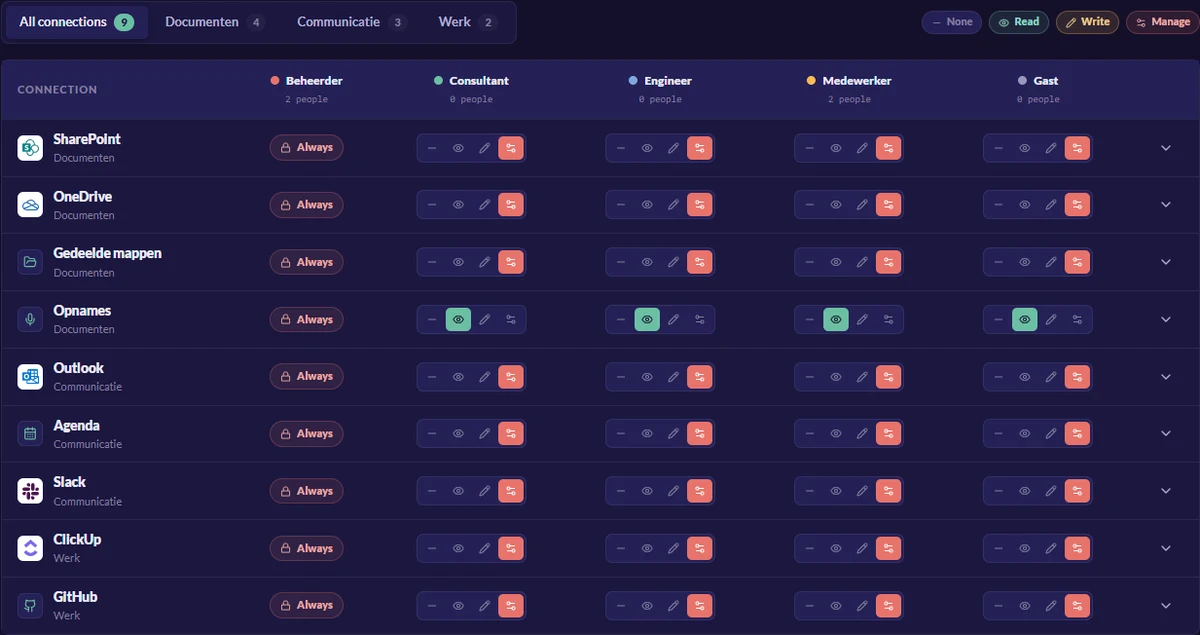
On the team screen you set what is allowed for each role and each connection. The AI can never do more than the user's role allows, not even when someone asks. That puts an extra check between your systems and the AI.
AI with your own knowledge
Cowork lets existing language models work with the knowledge of your organisation or of a single department: manuals, agreements and systems. That way you build a desk for employees or customers that answers from your own sources, with the source included.
All about AI with your own knowledgeDesks you can build with it
Subject to conditions: whether an integration through MCP or an API is possible depends on the software. We study that carefully first, in consultation with you and the software supplier.
Language models
Choose per user which models are available, and combine them. With the private model, with the DeepSeek or Mistral language model, you choose between a subscription per person and drawing everything from the team pot. You take the online models ChatGPT, Claude, Copilot, Gemini and Grok as a bundle, per user per month.
What makes Cowork different
Cowork switches between language models depending on the data you put in. Sensitive data stays with our private model within the EU; for general work you use the online model that fits best. Everything comes on one invoice, so you do not need separate contracts with each AI provider.
Read more:Claude for business Claude or ChatGPT ChatGPT for business Secure AI for business
Subscription
For people who use AI often. You know upfront what you pay, and you use the AI budget in the subscription at the best rate.
All from the pot
Useful when usage varies a lot, or when a few people use AI now and then. Everyone draws from the team pot and you pay afterwards for what was used.
Team pot
Next to the subscriptions sits the team pot: an amount per month that everyone in the team can draw from. Anyone who goes over their budget simply carries on. Once a month we invoice what was used and top the pot back up.
Schedule a task, such as a report, a summary of a file or a piece of research. Cowork keeps working after you go home, within your permissions, and the result is ready for you the next morning.
Pricing
You pay per user, per source and for AI. You take Managed Cowork on its own or together with Managed Operations; together, the price per user is lowest. A source applies to the whole organisation: you pay for it once, not per user.
Managed Cowork is also available on its own, without Managed Operations. A standalone rate then applies; you see the price after logging in.
Build your Digital Care(after signing in with an email code)How Digital Care is built
What we manage for you and what you use yourself are two things, and that is deliberate. They run on the same platform.
Our side. We manage and secure your IT: workplaces, Microsoft 365, network, backup and compliance.
Your side. The workplace where your organisation's sources come together, where everyone works with apps and AI and where you decide what takes part.
Signing in
Managed Cowork is linked to your organisation's Microsoft 365 environment, via Entra ID. You sign in with your normal work account; no extra password needed.
This is different from your Infodatek account on this website. You use that one for the prices, the configurator and your quotations.
With the app for Windows and Mac you share folders from your own computer with your organisation's workplace. On the Mac you can also record meetings with it for the Note Taker.
In half an hour we show the workplace with your systems in it, and together we choose which sources your organisation connects first.
Necessary cookies make the site work. Statistics and marketing are only switched on if you want them. Even without a choice, Google counts visits anonymously and without cookies. You can change your choice at any time. Read our privacy policy