

Managed Cowork
You see exactly what you are allowed to see, and nothing beyond
In Managed Cowork your systems and your AI come together. What someone gets back to a question depends on who asks it. Here we explain how that is arranged.
How a connection usually works
One key, and you can access everything
Many software packages have one general connection with one key. Whoever has that key can access everything. That is fine for linking two systems, but not when AI is attached that answers questions from your whole organisation.
A colleague who asks how a project is going should get the answer that fits their role. Not everything the key happens to be able to fetch.
What we put in between
An extra check between your systems and the AI
For every system you switch on, we build the connection. If that connection does not know roles itself, we put our own check in front of it. There the permissions of the person asking apply, before any data goes back.
That check is separate from your systems and separate from the AI model. You record once who may access what, and that applies across all your sources. If you choose another model later, your permissions simply stay in place.
So you never reach information you should not see. Not through the AI either.
Sources
The systems you switch on.
- SharePoint
- OneDrive
- Outlook
- Teams
- On-premises file server
- Cloud file server
- Slack
- ClickUp
- GitHub
- RentMagic
Connections
A connection per system, built by our engineers.
- MCP
- API
Permission check
Here the permissions of the person asking apply, before the data goes back.
Your organisation's AI workplace
The model you choose, answering within the role of the person asking.
- Administrator
- Consultant
- Engineer
- Employee
- Guest
How it looks in the application
Per integration you decide what a role may do
No sliders to guess at: your integrations sit underneath each other, your roles beside them, and you see at a glance what is switched on where.
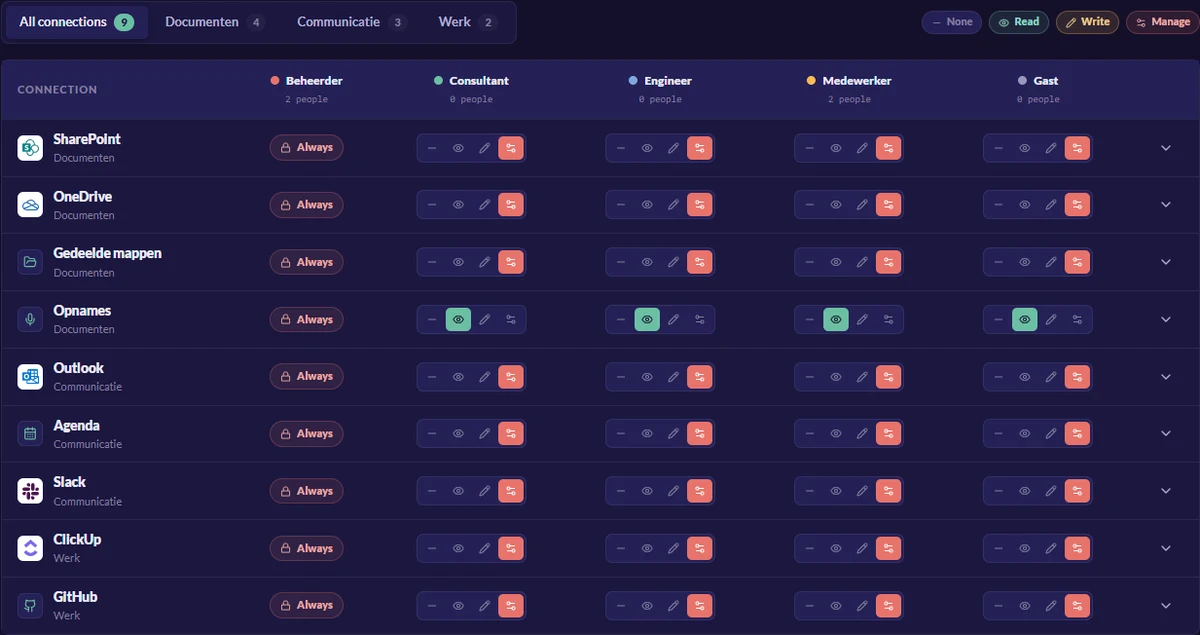
- None
- The role does not see the integration and cannot draw anything from it.
- Read
- View and quote, so the AI can draw on it for an answer.
- Write
- Create and change as well, for whoever actually does the work in there.
- Manage
- Switch the integration itself on and off. You keep that with a small group.
A user can never do more than their role allows. And because every change lands in the audit log, you can see afterwards who switched what on.
In short
Four things that go right because of this
Every system through the same gate
No connection reads your systems directly. Everything we connect goes through this check.
The person asking decides, not the key
What comes back depends on the permissions of the person asking.
The model does not matter
The check is separate from your AI. If you switch models, your permissions stay in place.
Visible afterwards
Every action and every AI answer is logged, with source, user and time.
Want to see this with your own systems?
In half an hour we show how your colleagues' permissions play out on your systems, and what you can set yourself.